
How to use Bloomi
A clear guide to the web platform and the iPhone and Android apps: from creating a family and rating the day to the child experience, devices, privacy and payments.
Bloomi is a playful world that grows with your family. Each evening you take a warm look at your child's day: 1 to 5 stars and a kind word if you like. Your rating is not a grade and not a punishment. It is a way of telling your child "I saw your day". Even a hard day earns a small reward, so there are no comparisons and no pressure.
How it works in three steps
You, in the parents' corner
Rate each child's day in under half a minute, and add a word of encouragement if you like.
Your child
When you hand over the phone they find the gift your rating brought (coins and XP) and see Mimo's bloom: their week as a small garden, a flower for each day you rated and a resting seed for each day you did not. No punishment, no streak to break.
Mimo's world
Your child spends their coins in the store to dress Mimo and decorate his room, plays free games, and learns in Bloomi Academy.
Inside the app
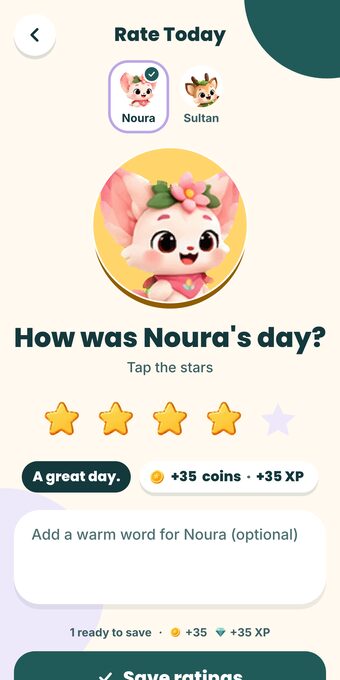
Rate today 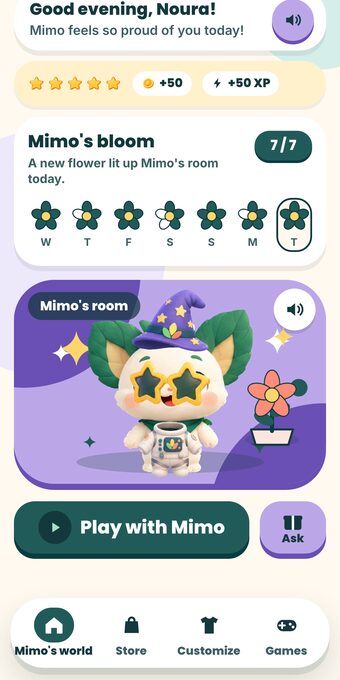
Mimo's world 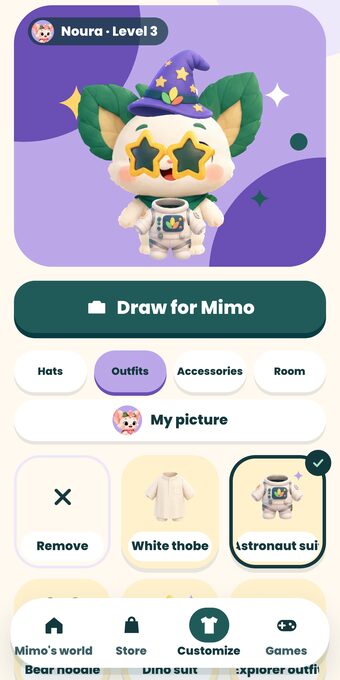
Mimo's wardrobe 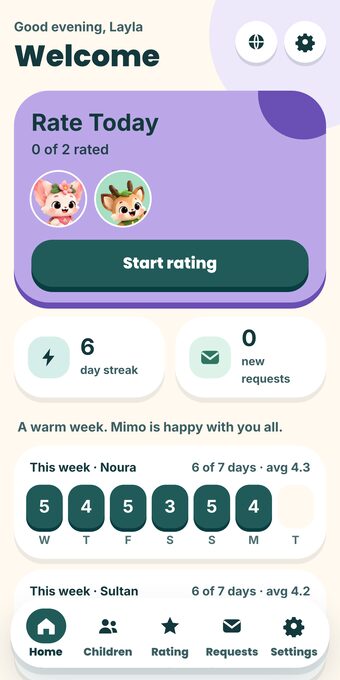
Parent home
The screens are from the app itself, with made-up family data.
Where can I use Bloomi?
- Website and apps: Use Bloomi on the website or in the iPhone or Android app. The same family account, children, ratings and progress sync across your devices when online.
- Parent account: Create an account with Google, or with Apple in the iPhone app. You manage the family from this account; your child needs no email or password.
- Two clear modes: Parent Mode is for ratings, follow-up and settings; Child Mode is for Mimo's world, missions, games and learning. Returning to Parent Mode is protected by a PIN or a simple maths question.
- Arabic and English: Switch language from Settings; Bloomi displays each language in its correct reading direction.
What does your child do in Bloomi?
- Mimo and his friends: Mimo is your child's companion, with Lumi, Nubee and Bloo. Your child picks their own profile picture from among them.
- Rewards and progress: Your child earns coins and XP from the daily rating and confirmed missions, and sees their level and weekly garden. Coins exist only inside Bloomi and cannot be bought with real money.
- The store and the wardrobe: More than 150 pieces: hats, outfits, glasses, scarves, little pets, toys, food, plants, and a Saudi pack (ghutra, shemagh, thobe, bisht, kufi). Your child buys them with coins they earned.
- Games: Seven free, open games: Room Rush, Cozy Kitchen, Treasure Map, Puzzle Paths, River Ride, Maze and the Garden.
- Bloomi Academy: 20 activities for maths, memory, observation, logic and focus, and Mimo reads the question aloud for a child who has not started reading yet.
- Mimo's missions: up to 3 small daily tasks that you choose (like "Brush teeth" or "Read a story"). They show for your child as big picture cards, your child taps "Done!" to tell you, and Mimo reads the list aloud for a child who has not started reading yet.
- Draw for Mimo: Your child draws on paper and photographs it, and Mimo wears the drawing. The photo is read on the device and is never stored or sent; only the small drawing Mimo wears is saved, and you can delete it from your child's page.
What do you control?
- Family dashboard: See your children, who was rated today, the weekly summary, new requests and missions waiting for your confirmation.
- Each child's profile: Add a child and edit their details, follow coins, level and ratings, choose missions, link their device, or delete their profile and data when needed.
- The parents' corner is protected: by a PIN you choose, or by a simple maths question if you have not set one. Your child cannot get in.
- Your child's requests: your child sends a wish or a gentle ask, and you answer with a yes, a kind no or a word of encouragement.
- Mimo's missions (optional): from your child's page you pick up to 3 daily tasks from a picture list (15 ready-made ones), or type one yourself. When your child taps "Done!" a request to confirm reaches your home page; you confirm, and they earn 5 coins and 5 XP, once per task per day. If you pick no tasks, your child sees none.
- More than one child and more than one parent: every child has their own world, coins and progress, and the family's owner invites the other parent with a one-time code.
- An optional evening reminder nudges you to rate the day.
- A device for your child: link it with 6 digits or by scanning a QR code, with no email and no password.
- One device for everyone: the "family device" (a tablet, say) is linked once, and each child picks their face and plays in their own world without you signing in. You can set a 4-digit secret code for each child so siblings do not open each other's world. It is a lock on the screen, not a technical wall: for complete separation give each child their own device.
Safety and privacy
- No ads or tracking: No ads, no tracking tools, and we never sell or rent your data.
- A child-safe experience: No chat with strangers, no leaderboards, no comparing siblings.
- Camera use: The camera is used only to scan a QR code and to photograph your child's drawing.
- Data controls: You decide: download all of your family's data or delete the account for good from Settings.
- Billing stays away from children: Payments and plan offers are never shown to children, and game coins are not money and cannot be purchased.
Subscription and payment methods
- Current status: No electronic payment method is active right now, no money is charged, and there are no in-app purchases. If Bloomi Plus is not shown in Settings, current features remain open according to the platform configuration.
- Current Plus request: If the platform administrator makes Plus visible, choosing monthly or yearly only sends a manual activation request; it is not a purchase and does not charge a card or store account.
- When billing is connected later: Payment in the iPhone and iPad app will use App Store in-app purchases, and Android will use Google Play Billing. Website payments are not currently supported.
- Managing Plus: One subscription covers the whole family. The platform administrator can show or hide the system, set child and mission limits, and make Games, Store or Studio available to everyone, Plus-only or off.
How do I start?
- Create your account with Google, or use Apple in the iPhone app.
- Add your child: their name, birth year and profile picture (Mimo, Lumi, Nubee or Bloo).
- Rate the first day: choose the stars and write a kind word if you like.
- Hand the phone to your child to open their world and find their gift.
- Turn on the evening reminder if you want rating to become a calm habit before bed.
Common questions
What age is Bloomi for?
It is designed for children from about 6 to 12. Younger children enjoy it with you, because Mimo reads the questions to them.
What if I forget to rate one day?
Nothing unpleasant happens: a resting seed shows in the week's garden, and there is no punishment.
Can my child buy anything with real money?
No. Coins are earned from your ratings and from playing, and there are no in-app purchases.
Which payment methods are supported now?
No payment method is active right now. A Plus request, if shown, is manual and charges nothing. Once billing is connected, iPhone payments will use the App Store and Android payments will use Google Play; the website does not currently accept payments.
Are Mimo's missions required?
No. They are optional, and Bloomi works fully with your daily rating alone.
Does it work in Arabic and English?
Yes, each in its own reading direction.